
I was running a structural depth audit using an internal byte-level analysis tool I built to measure where primary content begins in the HTML...
There’s a number that floats around SEO conversations: 2MB.
Some treat it like a hard rule. Others dismiss it entirely. Neither position is quite right.
Google’s official documentation states that Googlebot crawls the first 15MB of an HTML file. Anything beyond that is not considered for indexing. That 15MB figure refers specifically to the crawl fetch limit for HTML documents.
By default, Google's crawlers and fetchers only crawl the first 15MB of a file, and any content beyond this limit is ignored. However, individual projects may set different limits for their crawlers and fetchers, and also for different file types. For example, a Google crawler like Googlebot may have a smaller size limit (for example, 2MB), or specify a larger file size limit for a PDF than for HTML.
The older 2MB number often cited in SEO discussions is not an official Google cutoff. It emerged from earlier guidance and long-standing practical experience. Over time, many practitioners adopted ~2MB as a structural best-practice: not because Google mandates it, but because smaller HTML documents tend to be more crawl-efficient and structurally disciplined.
So no, Google does not “stop at 2MB.”
800KB of Navigation Before the Article Even Starts
I was running a structural depth audit using an internal byte-level analysis tool I built to measure where primary content begins in the HTML stream. Instead of looking at rendered DOM or visual layout, I downloaded the uncompressed source and calculated the byte offset of the first <main> tag.
Nearly 916KB of inline navigation logic and scripts were delivered before the article even started.
The page wasn’t oversized. Total HTML weight was within what most teams would consider acceptable. That’s what made it interesting. If you only look at total page size, you would have missed the problem entirely.
The issue wasn’t weight. It was order.
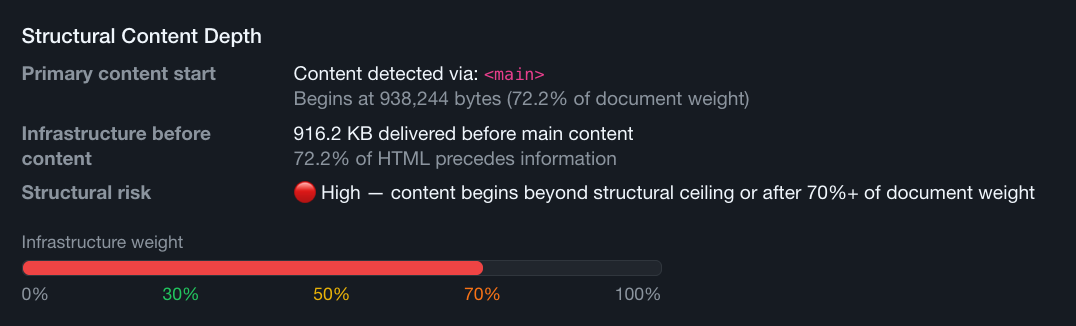
The page had a lot of inline code (JS and CSS) with infrastructure, formatting code: navigation configuration, mega menu datasets, feature toggles, tracking logic, personalization hooks. All injected before the first line of real content.
By the time the article began, almost half the document weight had already been delivered.
Structurally, the content was buried beneath a lot of framework overhead.
What That Means for Indexing
SEO isn’t an exact science, and I can’t claim Google “stopped” at 800KB. There’s no binary signal that tells you exactly where a crawler drew a line.
But we do know this:
Google may process HTML files up to 15MB.
The industry often treats ~2MB as a structural best-practice zone.
Neither number guarantees safety.
If navigation alone consumes 800KB before meaningful content appears, that’s 800KB less structural margin before you approach any practical ceiling, whether that ceiling is 2MB or 15MB.
Even without visible truncation, that architecture increases indexing risk.
The question isn’t whether Google saw the content.
The question is how much structural weight you’re burning before the content Google is supposed to index even appears in the document.
When infrastructure dominates the first half of a page, signal gets diluted. Content no longer leads.
That may not throw an error. It won’t show up as a red warning in Search Console. But it introduces inefficiency into the crawl process, and inefficiency compounds at scale.
Shared Includes Are the Usual Culprit
When I dug into the source, the cause was clear.
Heavy scripts tied to features that only existed on the home page were being included and executed on every single template. This is extremely common. Some CMS systems and websites rely on shared includes for headers and footers. One include stack. One global navigation. One feature bundle.
Convenient for development. Expensive for structure.
The article template didn’t even use half the features present in its own source code. The JavaScript was there. The UI components weren’t.
This is what happens when architectural convenience overrides document governance.
The solution wasn’t “optimize JavaScript.”
It was to rethink template sequencing.
We created conditional logic. We duplicated includes where necessary. The home page retained its full feature stack. Article pages received a leaner header and a reduced script payload.
Same visual output. Different structural discipline.
Stop shipping the same bloated include stack to pages that don’t use what’s in it.
From 900KB to 260KB Where Content Sits in the Stream Now
After splitting shared header and footer includes and removing all non-essential home page scripts from article templates, the <main> offset dropped from just above 900KB to roughly 260KB.
That’s a big shift.
Primary content moved from being buried deep near the midpoint of the document to appearing within the first 16% of the HTML stream.
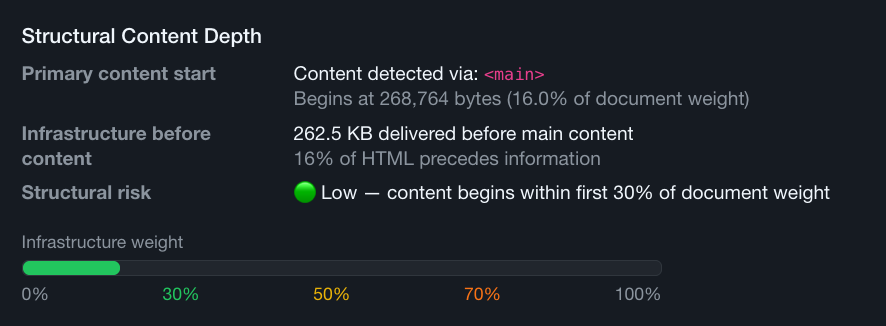
Total page weight didn’t change much. This wasn’t about page weight per se. It had more to do with placement of content in the whole. It was about prioritizing information over infrastructure.
Content was no longer competing with unused JavaScript and/or CSS code at the top of the document.
The home page still had its interactive modules. The article pages still functioned perfectly. Nothing visually broke. The only thing that changed was sequencing.
That’s the difference between performance tweaks and architectural governance.
Infrastructure-to-Information Ratio
Usually SEO teams measure:
- Total page size
- Core Web Vitals
- Time to Interactive
But very few SEO professionals measure:
- Byte offset of primary content
- Infrastructure-to-information ratio
- Structural sequencing in raw HTML
If 50% of your document weight precedes meaningful content, you are structurally deprioritizing the very thing you want indexed. Even if everything technically loads, you are introducing avoidable risk and burning crawl budget on framework overhead.
This is what I mean by structural ceilings.
It’s not about crossing a hard 2MB line. It’s about how efficiently you use the space before that line. It’s about margin. It’s about sequencing. It’s about governance.
Structural SEO & Document Maintenance
When navigation alone consumes 800KB before an article begins, that’s not a keyword issue. It’s not a metadata issue. It’s not even primarily a performance issue.
It’s an architectural issue.
Multiply that inefficiency across hundreds or thousands of URLs and you’re no longer talking about one bloated template. You’re talking about systemic crawl waste.
The fix wasn’t dramatic. It didn’t require replacing the framework or redesigning the site. It required being intentional about what ships where.
Lead with content. Deliver infrastructure after. Respect structural order.
That’s structural SEO.
And that’s the difference between optimizing pages and engineering documents.
Want to measure your own pages? I built the structural depth analyzer into my URL Scan tool.